

Three parts
- Hook: a moment that stops the scroll, in the first second.
- Show: the product or result in use.
- Call to action: what to do next, as text you add in the edit.
Plan for the cut
Make the three clips in the same style, light and format, so they cut together. Use the same character or product reference in each.
Keep it short
A few seconds per clip is enough. Add music and captions in your editor.
Label AI-generated content in ads where the platform asks for it.
A worked example
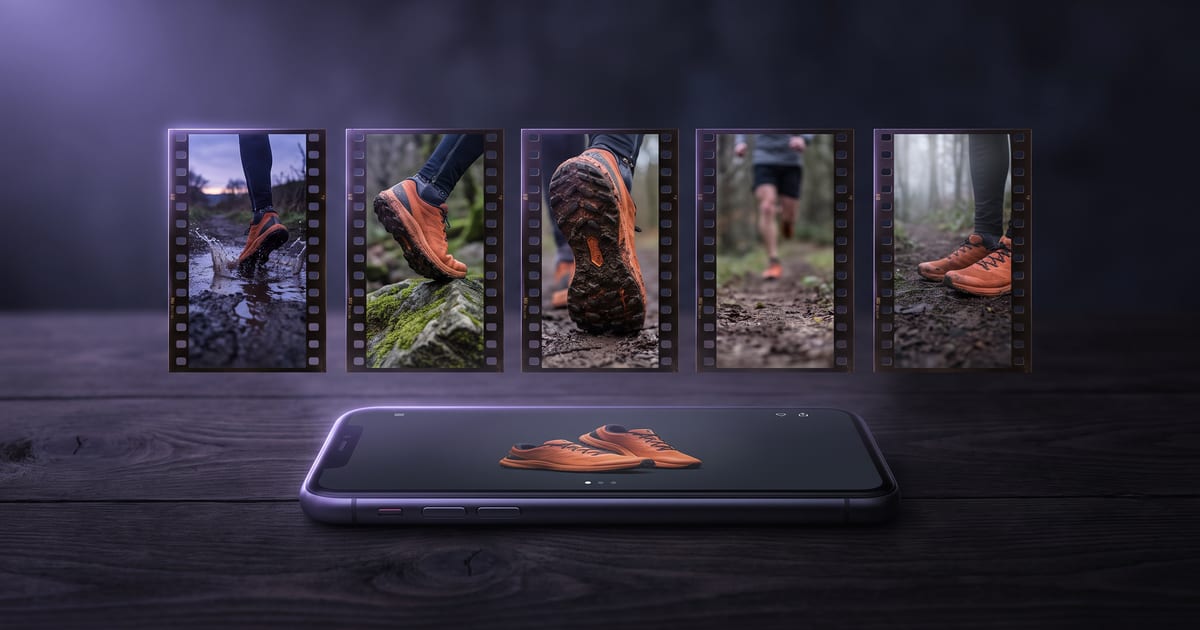
A trail running shoe, a vertical ad for Reels. Three stills first, all with the shoe photo as a reference and the same style sentence: "Early morning light low from the right, cool blue and orange tones, wet ground, shallow depth of field."
- Hook: "A trail shoe landing hard in a puddle, close to the ground, water spraying towards the camera." Motion: "the foot lands, the water bursts up in slow motion."
- Show: "A runner on a muddy forest path in this shoe, seen from the side at ankle height." Motion: "the runner passes, the camera panning with the feet."
- Call to action: "The shoe standing clean on a flat rock, morning light, the forest soft behind it, room above it for a line of text." Motion: "the camera dollies slowly in."
Hooks that stop a thumb
The hook has one job: make someone stay for the second clip. These work because something happens at once.
- An impact: something lands, splashes, breaks or opens.
- An extreme close-up of the product doing what it does.
- A talking character asking the question your buyer has.
- A before and after in one movement.

Stills first, then clips
Make the three stills in one session with the same style sentence and the same product reference, and lay them side by side. When they belong together, press Make a video of it under each one and write only the movement. Clips made from matching stills cut together without a jump in light or colour.
If one still is off, fix it before any clip runs. A still costs a fraction of a clip.
Sound for the ad
Many people watch with the sound off, so the ad has to work without it, and sound is the bonus for those who turn it on. Some video models make sound with the picture: PixVerse V6 makes cheap drafts with sound when you need it, and LTX 2.5 picture and sound from one shot brief.
For three clips cut together, one music track under the whole ad holds it together better. Lyria 3.5 is built for background music and mood; set the length to the edit.
One shape per placement
Decide where the ad runs before you make the first still. A vertical ad for Reels and a 4:5 ad for the feed are two sets of stills, each composed for its frame. Cropping one into the other cuts off the product or leaves it at the edge.
If you need both, make the vertical set first. Widen a copy of each still with the Expand image tool or make a new version with the vertical still as a reference, then animate each shape on its own.
Check the cut before you spend
Put the three stills in your editor in order, a few seconds each, before any clip exists. Watch it like a viewer. Does the hook land at once? Does the product show clearly in the middle? Does the last frame leave room for your line? Fixing the order or a still now costs nothing; fixing it after three clips costs three clips.
Templates that get you started
Each opens as a flow on the canvas, so you can swap the prompts for your own before you run.
- Product to UGC: a product photo turned into UGC-style content, in three models at once.
- Food commercial: describe a dish, get a hero shot and an eight-second slow-motion commercial with sound.
- Motion poster: a title and a line in, a vertical poster that moves, with sound, out.
Mistakes that cost the click
- A logo or slow fade as the first second.
- Three clips in three different lights: the ad looks stitched together.
- The price or offer written inside a clip, where it comes out garbled. Add it in the edit.
- A call to action without a reason: say what they get, not only "shop now".
Questions
Which format?
9:16 for Reels, Stories and TikTok, 1:1 or 4:5 for feeds.
Can I use a talking character?
Yes, a talking character makes a strong hook.
How long should the whole ad be?
Short enough to watch before the thumb moves on: three clips of a few seconds each. Make the hook the shortest. If the ad needs more time to explain, the idea is too big for one ad; split it into two.
Can I make several versions of the hook?
Yes, and it is the cheapest place to test. Make two or three hook stills, keep the show and the call to action the same, and run the ad with each hook. The hook decides most of whether people stay.
Can the assistant plan the three clips?
Yes. Paste a link to the product page in the AI Assistant and ask for a short ad; it proposes a film in scenes with a voice-over and music, ready to change on the canvas. Or describe the three clips yourself and ask it to set them up.
Read next

Put this guide to work
Open the studio and try what you just read. You start with 1,000 free credits.
Get early access