
Tool
Keep the same character
Reference images that carry one person, product or place across a whole sequence. One to five reference images of the thing that has to stay the same. A clip in which that character is recognisably the same one.
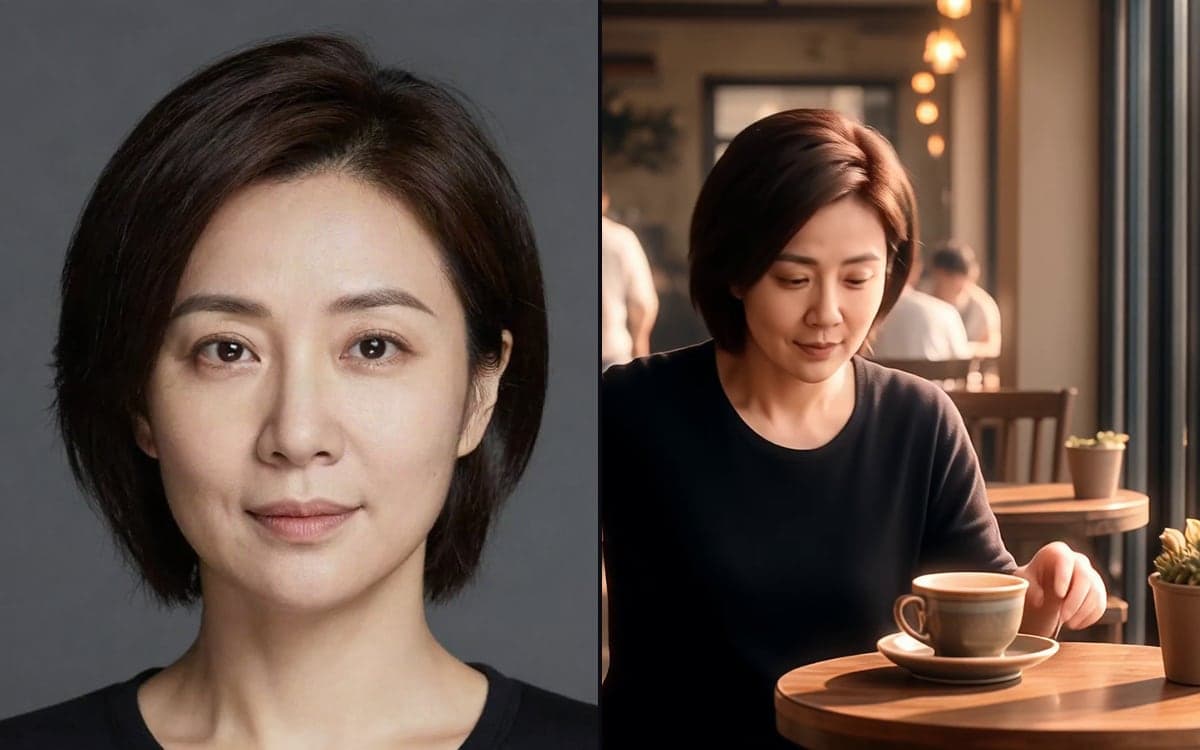
How it works
- 1Add your referencesPhotos of the face, the product or the location. A handful of clear ones beats twenty of anything.
- 2Give each one a jobPoint at them in the prompt as @img1 and @img2, and say what each controls, the face only, the outfit only, the room.
- 3Describe the new sceneWrite what happens, not what the character looks like. That is what the references are for.
What people make with it
Six clips with the same presenter, instead of six people who vaguely resemble each other.
The same bottle on a kitchen counter, in a bag, on a beach, still the same bottle.
Build it once and reuse the references every time.
Get early access
The studio opens in stages. We let people in in the order they signed up, and you start with 1,000 free credits.
Claim your spotGood to know
Repeating the character in words competes with the reference image. Say what happens, and let the picture say who.
"@img1 sets the face and hair only, not the clothing or the background" works better than "use @img1".
Questions
How many references can I add?
Up to ten. One per thing that has to stay the same beats a pile of near-duplicates.
Is this the same as a LoRA?
No. A LoRA is a trained file that carries a style or a face everywhere. References work per generation and need no training.
Start making it yourself
The studio opens in stages. We let people in in the order they signed up, and you start with 1,000 free credits.
Get early access