
STUDIO
Every top model for image and video. One balance.
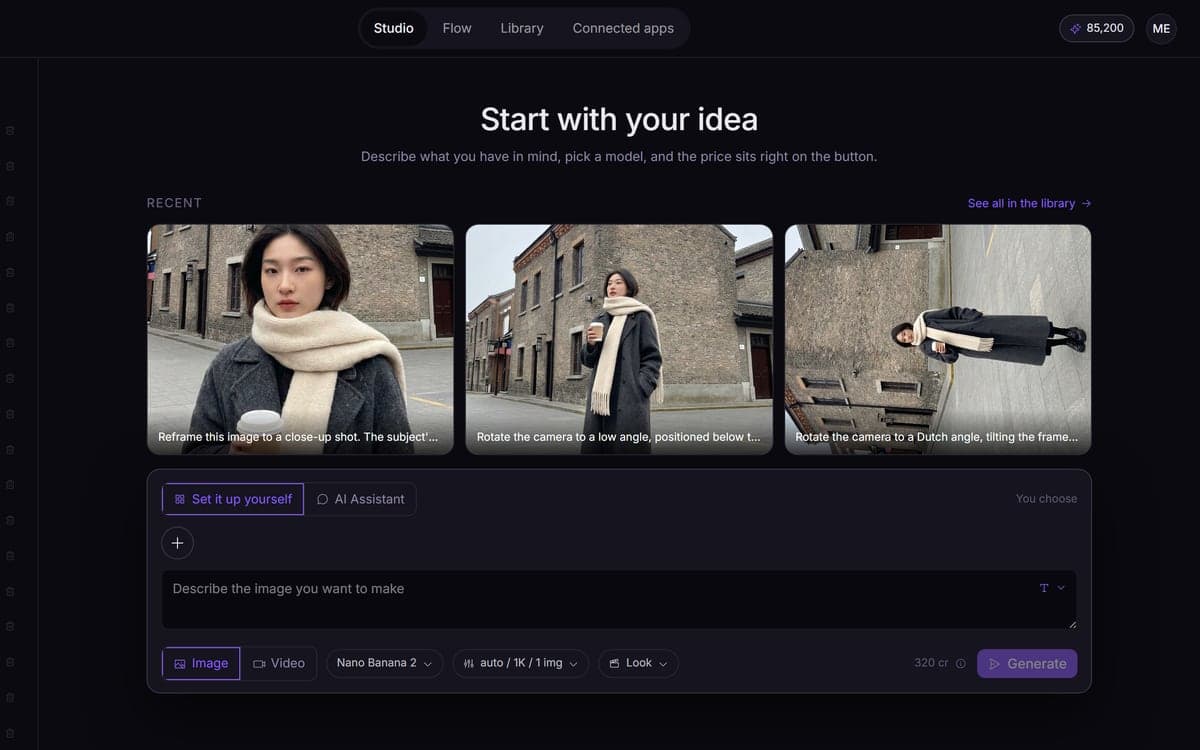
141 image and video models in one screen, paid from one credit balance that never expires. Type what you want, see the price on the button, and press go. Choose the model yourself or let the studio choose.
How it works
- 1Type what you wantOne bar for everything: image or video, prompt, references, settings. The tool can rewrite your prompt into the form the chosen model responds to best.
- 2Add what you haveA reference image, a start frame, an existing clip, or the style you trained. The studio switches to the model variant that can actually use it, and says so instead of failing later.
- 3See the price, then goThe number on the button already includes your model, your resolution, your duration and your sound. It moves when you change something, so nothing is a surprise afterwards.
- 4Keep working from the resultRun it again, edit it with an instruction, use it as a reference, upscale it, or turn it into video. Everything you make stays in a session and in your library.
What people make with it
No canvas and no set-up. Type a sentence and get a result.
Sessions keep a set together on one screen, so ten images stay one series instead of scattering.
Send the still you like straight into a video model as its first frame, without leaving the screen.
Attach your LoRA and it works in image and video, in the studio and on the canvas.
Every model shows what it is good at and what it costs, so you choose per job instead of guessing.
A connected agent can do everything the studio does, with the same models and prices.
Get your seat in the studio
The studio opens in stages. We let people in in the order they signed up, and you start with 1,000 free credits.
Claim your spotGood to know
Credits per run instead of a subscription per provider. Credits you buy never expire.
Each model shows only the options it really has, so a setting you pick is a setting that works.
Run it again, edit it, upscale it or turn it into video. Nothing you make is a dead end.
Commercial use is allowed on every model. We claim no ownership and never train on your work.
If a run breaks on our side or at the provider, you get every credit back.
New accounts come in through the waitlist, in the order people signed up. You start with 1,000 free credits.
Questions
What is dGEN Studio?
One screen with 141 AI models for image and video, instead of an account and a subscription per provider. You type what you want, add a reference or your own style if you like, and see the price before you start.
Do I need to know which model to use?
No. Leave it and you get one that fits the job. Want to choose? Every model lists what it is strong at and what it costs. Or describe the outcome and the assistant picks for you.
How is this different from using the models directly?
One balance instead of several subscriptions, a price you see before you spend it, and results that carry on into the next step. Plus your own style everywhere, flows you can reuse and an agent that can run it all.
What does it cost?
You pay per run, and the exact price is on the button. Packs start at €15 for 15,000 credits, about 93 images with Nano Banana or 10 short clips with Kling 2.5 Turbo. Credits never expire.
Can I sign up today?
The studio opens in stages. Join the waitlist: we let people in in the order they signed up, and you start with 1,000 free credits.
Start making it yourself
The studio opens in stages. We let people in in the order they signed up, and you start with 1,000 free credits.
Get early access