
The sketch decides the layout
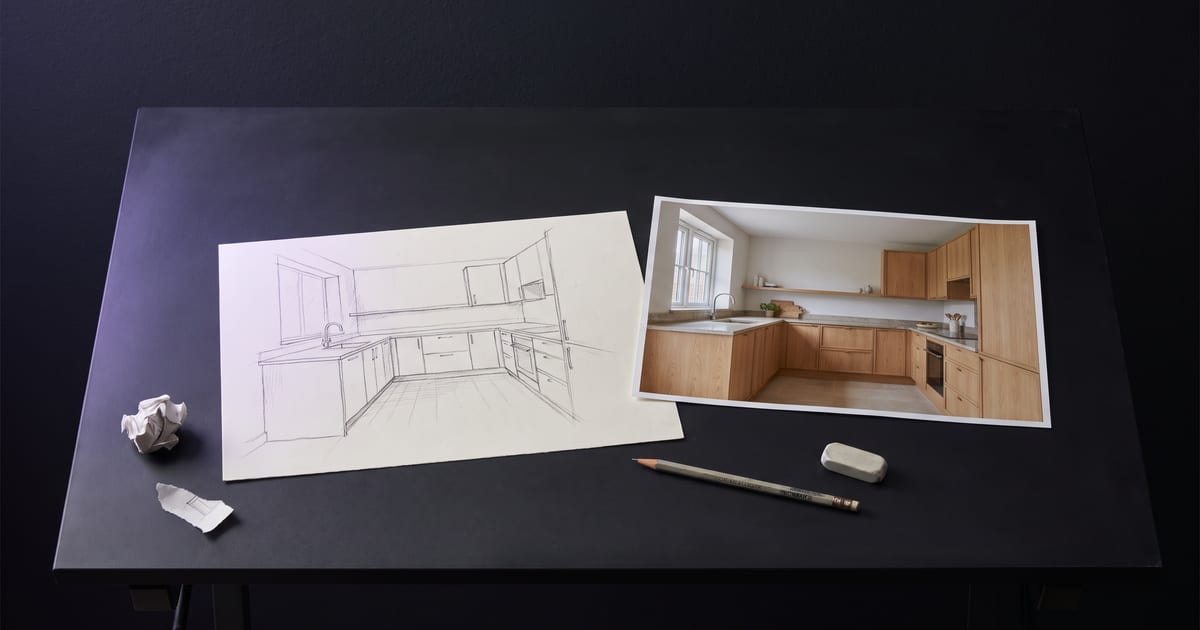
Words are bad at saying where things go. A quick sketch is good at it. Use it as a reference image, and the model keeps the layout while you describe materials, light and style.
What to draw
No detail needed. A phone photo of a pencil sketch is enough.
- The main shapes and where they sit.
- The horizon or the floor line.
- Where the light comes from, with an arrow if you like.
What to write
Describe what the sketch cannot show: materials, colours, light, the mood, the camera. "A sunlit kitchen in light oak, morning, soft shadows, 35mm" turns boxes into a room.
Iterate
If one part is wrong, edit that part instead of starting over. Make it, then change it.
Questions
Which models take a sketch?
Models that take a reference image. The model button shows which ones.
Can I sketch on paper?
Yes. A clear photo of it works.
Read next


Put this guide to work
Open the studio and try what you just read. You start with 1,000 free credits.
Get early access