
TEMPLATE · IMAGE · 6 STEPS
AI influencer
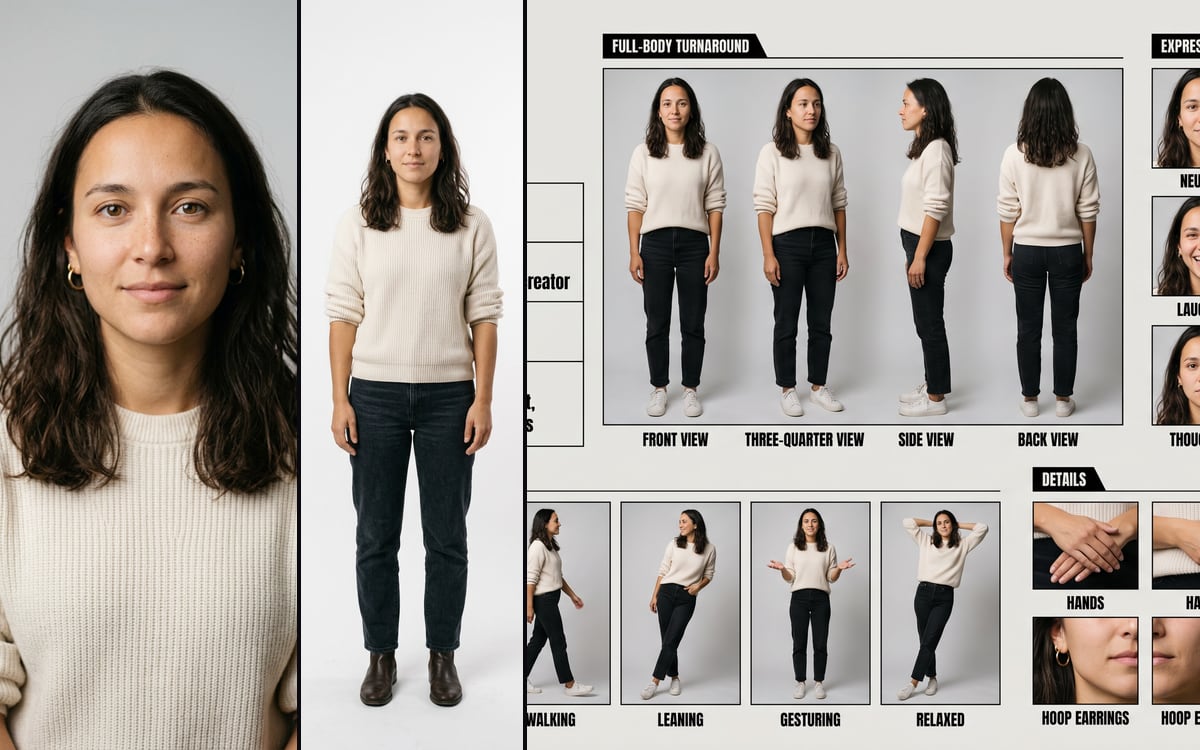
Make the character, then its continuity sheet: a portrait, a full body of the same person, and the sheet you use for every video after.
For creators and brands starting an AI influencer or a virtual ambassador from scratch.
What you get, and how to use it
Three steps, left to right. 1. Make the influencer. Describe who it is in the first prompt, or attach a photo to the portrait for a real person (yourself, or someone who agreed to it). You get a portrait, and a full body made from that portrait, so it is the same person. 2. Make the sheet from those two: turnaround, expressions, poses and details. 3. It is a character. Want it saved with its own folder in your library? Build it in dGEN Influencer on the Studio screen: same steps, and it saves itself.
The AI models in it
Questions
What does the AI influencer template cost?
You pay per step you run, in credits that never expire. Every step shows its price on its button before you press it. If a step fails before the model has made anything, you get every credit back.
Can I change the models or the prompt?
Yes. A template becomes an ordinary flow the moment you open it. Every model, prompt and setting stays yours to change, and you can save it as your own.
Which AI models does it use?
Nano Banana 2.1, Nano Banana Pro.
More templates
Start from AI influencer
The studio opens in stages. We open access in the order people signed up, and you start with 1,000 free credits.
Get early access